Table of contents
Open Table of contents
Overview
Freeplane is a software application designed for creating mind maps and structuring knowledge. It functions as a digital whiteboard where users can organize ideas, manage projects, and store information in a hierarchical tree structure. The software is suitable for students, project managers, and developers who need to visualize complex data relationships or brainstorm concepts.
The core functionality extends beyond simple diagramming. It supports task management, integration with external resources, and the addition of metadata to nodes. Users can write scripts to automate repetitive tasks, hide or show branches of the map to focus on specific sections, and format content using rich text.
Technical Stack
Freeplane is built entirely on Java (specifically requiring Java 11 or higher). It utilizes the Swing toolkit for its graphical user interface (GUI), making it a cross-platform desktop application. The scope is strictly local-first; the software runs as a standalone executable on the host machine without requiring a backend server or cloud connection for core functionality.
Privacy & Security Architecture Audit
Data Handling & Telemetry
The application operates on a local-first architecture. Data is persisted to the local filesystem. Network activity is limited to specific user-initiated actions, such as checking for software updates or using scripts that explicitly make HTTP requests.
- Evidence: The update mechanism is implemented in
freeplane/src/main/java/org/freeplane/main/mindmapmode/UpdateCheckAction.java. The code targets a SourceForge URL to fetch version history text files.
// Target URL for version checking
private static final String UPDATE_URL = "https://sourceforge.net/projects/freeplane/files/freeplane%20stable/";

// Add-on update request construction
final String addOnUpdateRequest = updateUrl + "?v=" + addOnLocalVersion.toString();
When checking for add-on updates, the code appends the local version number (?v=...) to the request URL. It does not append unique user identifiers or machine IDs, despite a comment in the source code suggesting such a feature was considered for statistics. Automatic checks are throttled to occur once per day (ONE_DAY) if enabled by the user preference CHECK_UPDATES_AUTOMATICALLY.
Implication: If the network is monitored, an observer sees standard HTTP/HTTPS requests to SourceForge. Metadata leakage is minimal; the request exposes the installed Freeplane and add-on versions but no personal data.
Cryptography & Storage
Freeplane allows users to encrypt individual node content or entire map branches. The application relies on the Java Cryptography Architecture (JCA) for security operations.
- Algorithms: Implementation details for specific ciphers (such as AES) are handled within the
org.freeplane.features.encryptpackage. - Key Management: Encryption keys are derived directly from user-provided passphrases. The application does not use key management servers or cloud-based key storage.
- Structure: The default file format is XML (
.mm). The serialization logic handles saving and loading data structures from the local filesystem. If encryption is enabled for a node, the content is serialized as a ciphertext string within the XML structure rather than plain text.
Identity & Auth
Freeplane is a local tool. No identity provider (IdP), email, or account registration is required to launch or use the software. Tracking across sessions is impossible via external means because no session tokens or unique user IDs are generated or transmitted. Authentication is purely the responsibility of the host operating system’s login mechanism.
Usability & UX
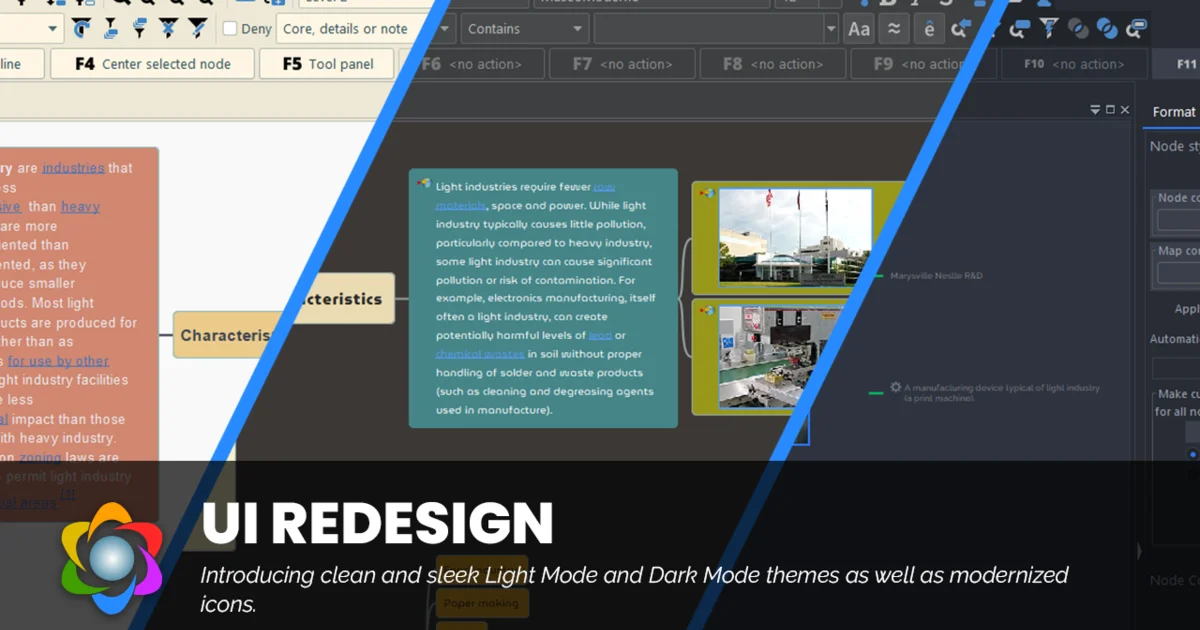
The interface presents a canvas with a central root node. Users create child nodes by pressing the Tab key and sibling nodes by pressing the Enter key. This keyboard-centric workflow allows for rapid data entry without relying on mouse navigation.
The learning curve is moderate. While basic mapping is intuitive, advanced features—such as scripting (Groovy), conditional formatting, and adding icons—require exploring the documentation or menu system. The UX prioritizes functionality and information density over minimalism. The design does not sacrifice security for convenience; rather, it gives the user full control over file permissions and encryption settings at the cost of manual configuration.
Technical Pros & Cons
Pros:
- Offline-First Architecture: The codebase lacks dependencies on external APIs for core features, ensuring functionality without internet access.
- Scripting Extensibility: Built-in support for Groovy and Python scripts allows users to programmatically manipulate maps and data.
- Standardized Storage: Uses XML (
.mm) and Markdown for content, ensuring data portability and readability even outside the application.
Cons:
- Java Dependency: Requires a Java Runtime Environment (JRE), which increases the attack surface compared to native C/C++ applications.
- XML Parsing Risks: The reliance on XML for map storage necessitates robust parsing to prevent XXE (XML External Entity) attacks if loading files from untrusted sources.
- UX Complexity: The abundance of toolbars and menu options can clutter the workspace, potentially overwhelming users seeking simple mind mapping.
Verdict
Freeplane is a robust, privacy-centric tool for knowledge management. Its strict local-first operation ensures data sovereignty. The inclusion of encryption for sensitive content provides a necessary layer of defense. The reliance on Java and the complexity of the UI are trade-offs for its cross-platform compatibility and feature set.
Security Note: By default, maps are saved as plain XML files without encryption. To protect sensitive data at rest, users must manually enable password protection for specific nodes or utilize Full Disk Encryption (FDE) on their operating system.