Table of contents
Open Table of contents
Overview
Clonezilla is a partition and disk imaging/cloning program designed to facilitate system deployment, bare metal backup, and recovery. It creates copies of data at the file system level or the block level, allowing users to duplicate single drives or massive arrays of machines simultaneously. It serves system administrators managing large data centers, IT professionals handling hardware refreshes, and advanced users seeking reliable backup solutions without proprietary software overhead.
The software is built on a foundation of GNU/Linux tools, primarily utilizing Partclone to read and write only used blocks in a filesystem. The core logic is implemented in Bash shell scripts, orchestrating low-level utilities like partimage, ntfsclone, and dd. Clonezilla operates in two distinct modes: as a live distribution (Clonezilla Live) for single-machine backups and as a server (Clonezilla Server Edition - SE) for network-wide multicasting.
Privacy & Security Architecture Audit
Data Handling & Telemetry
Clonezilla operates primarily as an offline tool. Data flows directly from the source disk (or partition) to the destination storage medium, which may be a local USB drive, an SSH server, a Samba share, or an NFS server.
Technical Evidence:
An analysis of the ocs-functions file, the core library containing the logic for all Clonezilla operations, confirms the software does not initiate outbound connections for telemetry. Networking functions are utilized strictly for user-initiated data transfer.
In the ocs-functions file, the check_network function is defined to verify connectivity to user-specified targets (like a SAMBA or NFS server) before data transmission. It uses standard ping utilities without transmitting any metrics to external endpoints.
# Snippet from ocs-functions
check_network() {
  # $1: IP address
  [ -z "$1" ] && return 1
  ping -w 1 -c 1 $1 &>/dev/null
}
Implication:
If the network is monitored during a backup operation, the data transmitted consists of the disk image itself. Since Clonezilla does not employ proprietary wrapping protocols, traffic visibility depends entirely on the transport protocol chosen (e.g., SSH provides encryption, while standard NFS does not). No unique identifiers or usage statistics are transmitted to Clonezilla developers.
Cryptography & Storage
Clonezilla supports encryption for image files to ensure data confidentiality at rest or in transit. When encryption is enabled, the software utilizes aespipe, leveraging the AES (Advanced Encryption Standard) algorithm, specifically CBC (Cipher Block Chaining) mode, often with a 256-bit key size.
Key Management:
Keys are derived from the user-provided passphrase entered during the image creation process. The software passes this passphrase to aespipe or gpg to encrypt the data stream piped from partclone.
Technical Evidence:
The encryption command construction is handled in the ocs-functions file within the ask_and_prepare_encryption_tools function. A case statement evaluates the enc_mode variable to assign the appropriate command to enc_prog_cmd.
# Snippet from ocs-functions showing encryption command construction
    case "$enc_mode" in
      aes256) enc_prog_cmd="aespipe -e AES256 -C 1000" ;;
      gpg) enc_prog_cmd="gpg --batch --no-tty --passphrase-fd 0 -c -z 0 -a" ;;
    esac
# Data flow logic from ocs-sr: partclone | $enc_prog_cmd | gzip | split
Structure:
Clonezilla uses a custom directory structure for its images. Each image consists of a directory containing:
- Metadata files (e.g.,
parts- listing partition table info;disk- disk geometry). - Partition data files (compressed and optionally encrypted images of the specific partitions, usually named
sda1.aa,sda1.ab, etc.).
Identity & Auth
Authentication is entirely localized. No account creation, email registration, or cloud login is required to operate Clonezilla.
- Local Mode: No authentication is required. The user boots into the ISO and has immediate root access to the CLI/TUI interface.
- Network Mode (Server/Client): Authentication depends on the protocol selected. If using SSH, standard public/private key or password authentication is required. If using SAMBA/NFS, the credentials for those shared services are required.
The system generates no persistent pseudonymous IDs for the user. The “identity” in a Clonezilla environment is strictly the hostname of the machine being cloned, which is configurable and not used for tracking outside the local network segment.
Usability & UX
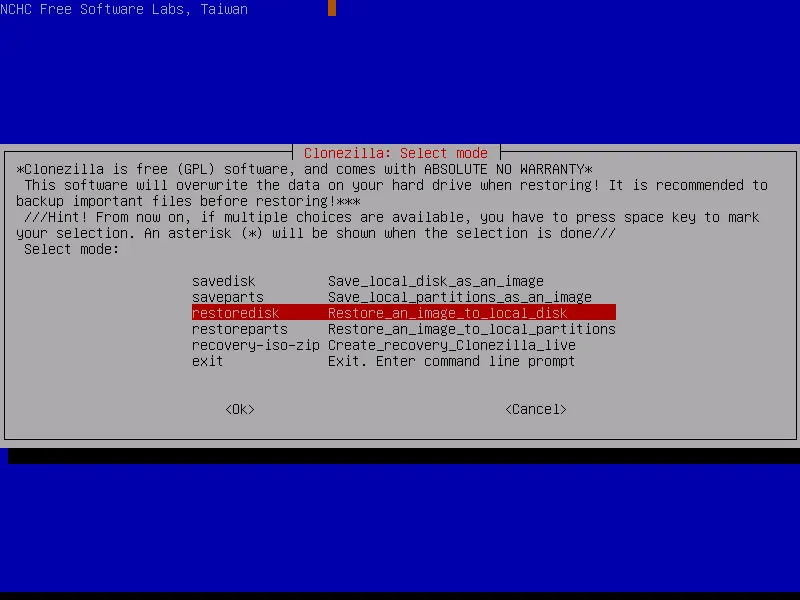
Clonezilla utilizes an ncurses-based Text User Interface (TUI). While the interface is stark and lacks graphical elements, it is logically structured with a wizard-like progression that guides the user through selecting language, keyboard layout, and mode (Beginner vs. Expert).
The learning curve is steep for non-technical users due to the reliance on disk partitioning terminology (e.g., distinguishing between /dev/sda and /dev/sdb1). However, for the target audience (system admins), the interface is efficient and scriptable. The UX prioritizes stability and data integrity over visual appeal. The “Beginner” mode hides dangerous options (like overwriting the boot sector without confirmation), striking a balance between safety and functionality.
Technical Pros & Cons
Pros:
- Filesystem Awareness: By utilizing
partclone, Clonezilla only copies used blocks, significantly reducing backup size and time compared to rawddcopying. - Multicast Deployment: Clonezilla Server Edition (DRBL-based) allows simultaneous imaging of dozens of machines over a local network, drastically reducing deployment times in labs.
- Hardware Agnostic: Supports a vast array of file systems including ext2/3/4, ReiserFS, XFS, JFS, Btrfs, NTFS, FAT, and HFS+.
- Scriptability: The underlying Bash scripts can be modified or called directly for automated backup tasks via Cron.
Cons:
- No Incremental Backups: The standard edition does not support incremental or differential backups; it requires full image creation every time (though alternatives like Clonezilla Lite or
partclonemanual usage offer partial solutions). - Destructive Potential: The software operates at a low level. Selecting the wrong source or target disk can result in immediate, irreversible data loss without a “Recycle Bin.”
- Interface Limitations: The TUI does not support mouse interaction, requiring keyboard navigation which can be cumbersome in complex menu trees.
Verdict
Clonezilla remains the gold standard for open-source disk imaging, offering robust, reliable, and secure cloning capabilities. Its architecture ensures that data remains under the user’s control, with no telemetry leakage. While the lack of a graphical interface and incremental backups may deter casual users, its efficiency and support for enterprise-grade multicasting make it indispensable for system administration.
Security Note: Clonezilla images are not encrypted by default. If saving sensitive data to an unencrypted external drive or network share, it is critical to manually enable the AES encryption option during the image creation process. Furthermore, storage devices containing backup images should be encrypted using Full Disk Encryption (FDE) such as LUKS (Linux) or BitLocker (Windows) to prevent data access in case of physical theft of the drive.