Table of contents
Open Table of contents
Overview
GParted (GNOME Partition Editor) is a standard tool for managing disk storage on Linux and other systems. It allows users to create, delete, resize, and move partitions without losing data. Whether you need to make space for a new operating system or expand a storage volume, this utility handles the low-level formatting and structure changes.
The software is built on C++ and uses the GTKmm toolkit for its interface. It acts as a graphical controller for the command-line tool parted, sending instructions directly to the kernel. This means all operations happen locally on your machine—there is no cloud processing involved.
Privacy & Security Implementation
GParted is designed as a local-only tool. It does not require an internet connection to function, and the code structure confirms it does not collect or send user data anywhere.
Data Handling
The application works directly with your hard drive’s block devices. It manipulates the physical layout of the disk, writing changes to the Master Boot Record (MBR) or GUID Partition Table (GPT). Device discovery and file system recognition happen by reading raw bytes from the hardware, not by querying a database.
Code Evidence: In src/GParted_Core.cc, the software detects file systems by comparing local disk sectors against known “magic numbers” (signatures).
// src/GParted_Core.cc
// Direct byte comparison to identify file systems locally
static const struct {
    Byte_Value  offset1;
    std::string sig1;
    FSType      fstype;
} signatures[] = {
    { 0LL, "LUKS\xBA\xBE", 0LL, "", FS_LUKS },
    { 3LL, "-FVE-FS-",     0LL, "", FS_BITLOCKER },
    // ... raw signatures for NTFS, APFS, BTRFS, etc.
};
Since the build scripts (Makefile.am, configure.ac) contain no references to external APIs or network libraries, the software creates no network traffic. This ensures that partition layouts and file structures remain private.
Cryptography & Storage
GParted itself does not encrypt files; it manages the containers where data lives. If you use encryption like LUKS, GParted sees the partition as a raw block of data. It can resize the encrypted container, but it does not handle the encryption keys itself—those are managed by the Linux kernel.
The application does not use a proprietary database to store your actions. It keeps track of pending changes in memory and writes them directly to the disk only when you click “Apply”.
Identity & Permissions
Because changing disk partitions is a sensitive operation, GParted requires administrative access. It does not use its own accounts or email logins. Instead, it relies on the system’s sudo or pkexec mechanisms to verify that you have the right to modify the drive. This means your identity is tied strictly to your local user account.
Usability & UX
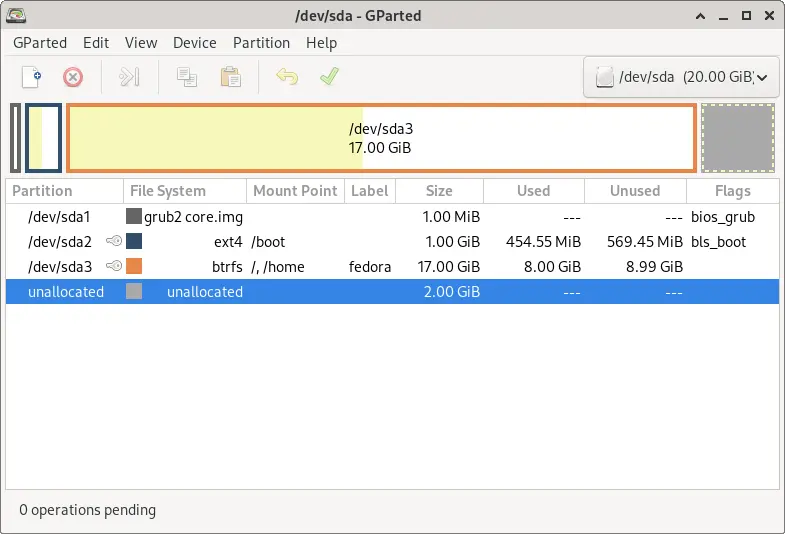
The interface displays a visual map of your drives, using color to distinguish between different file systems (like ext4, NTFS, or btrfs). This makes it easy to see how much space is used and how much is free.
GParted uses a “pending operations” model. When you ask to resize or move a partition, the software adds the task to a queue but doesn’t execute it immediately. This allows you to plan multiple changes and review them before the actual writing begins. This is crucial for data safety, as disk operations are often irreversible.
Technical Pros & Cons
Pros:
- Direct Hardware Control: The source code confirms direct interaction with
libparted, ensuring precise control over the disk. - Supports Many Formats: It integrates with external tools (e.g.,
ntfsresize,btrfs) to handle almost any file system. - Zero Network Dependency: The code is completely self-contained, making it safe to use on offline or air-gapped machines.
Cons:
- Requires Root Access: To function, the app must run with administrator privileges, which can be risky if the system is already compromised.
- Risk of Data Loss: While the UI is helpful, moving the start point of a partition is a complex operation. A power failure during this process can corrupt data.
- External Dependencies: GParted relies on other system utilities being installed and up to date to work correctly.
Verdict
GParted is a powerful, necessary tool for anyone managing disk space on Linux. Its local-only architecture ensures privacy, and the queued operation system protects against accidental clicks. It is trustworthy software that does exactly what it claims without hidden background processes.
Security Note: This tool changes your disk structure but does not encrypt your files. For total privacy, ensure your drive is encrypted using Full Disk Encryption (FDE) like LUKS before using GParted.